
 Kontakt
  Infocenter
  Log ind
  0 Indkøbskurv Indkøbskurv Indkøbskurv
 Ingen varer
0 Spil til en total pris af: 0,00 €

Tomb of the Bloodletter (PC)


Your keyboard is your arsenal. Your words are your weapons.
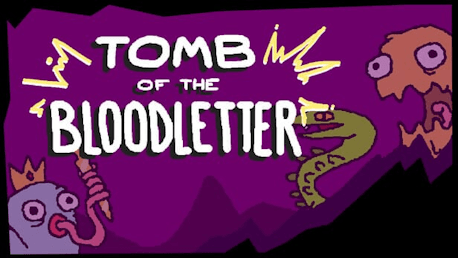
Tomb of the Bloodletter is a strategic word roguelike where each letter of your keyboard channels unpredictable Magicks. Combine them into tactical words to unleash devastating attacks, clever defenses, and absurd effects as you battle your way through the cursed halls of a dingy, haunted tomb.

Whether you play as the Heretic, Adventurer, Scholar, or Prophet, every character brings quirks and abilities that twist the rules of the game and change your approach to combat. A Scholar whose brilliance fades turn by turn. A Prophet indebted to a demanding “lord.” No matter who you choose, you won’t survive unscathed.

At the start of each floor, you’ll craft a word to form your path. Choose between rooms that strengthen your arsenal, restore your health, or twist your Magick rerolls. You can have it all… if your vocabulary is sharp enough to forge it.
Enter a floor and your letters hum with Magicks. Create tactical combinations by mixing Magicks that should probably never interact. They obey peculiar rules, and mastering them is half the fun. One might strike harder if placed at the end of a word, another might heal you, and a third might hurt you simply for using too many vowels. The most cursed can become your greatest weapon… if you’re clever or desperate enough.
As you descend, you’ll acquire new Magicks, whether you want to or not, slowly turning your keyboard into a deck of magnificent, uncontrollable chaos. It’s not just your loadout; it’s your spellbook, your weapon rack, and your greatest liability.
Success isn’t a big vocabulary, it’s tactical combinations: sequencing the right letters, at the right time, in the right word.

The Tomb crawls with cursed beasts, deceitful specters, and entities best left unspoken. Each foe is handcrafted with unique mechanics that demand clever thinking and precise wordplay to overcome. Use every ounce of your tactical and verbal acumen to overcome their dastardly tricks!

Claim the Bloodletter—or else it shall spell your doom.

Hvordan virker det? Modtager jeg Tomb of the Bloodletter fysisk?
Nej, du modtager en Tomb of the Bloodletter produktnøgle (Tomb of the Bloodletter CD Key), som du modtager via e-mail. Du skal derefter bruge Steam-platformen til at indløse din Tomb of the Bloodletter produktnøgle (Tomb of the Bloodletter CD Key), og du er derefter klar til downloade, installere og spille Tomb of the Bloodletter. Ved køb af spillet, modtager du samtidig en vejledning til hvordan dette gøres, hvis du skulle være i tvivl. Så bliver det ikke nemmere!
Tomb of the Bloodletter is a strategic word roguelike where your keyboard becomes your arsenal. Use your wit to unleash deadly words through tactical combinations of your letters to defeat the denizens of this dingy tomb and claim the Bloodletter for yourself...
Minimum:
- OS *: Windows 8 or Later
- Processor: Intel Core i5
- Memory: 2 GB RAM
- Graphics: GeForce 7300 GT (512 MB), Radeon X1300 Pro (256 MB)
- Storage: 200 MB available space
Der er i øjeblikket ingen anmeldelser