 Contact
  Infocenter
  login
login Requires the base game Planet Coaster 2 on Steam in order to use Planet Coaster 2: Toybox Pack.

 0 Artikel Artikel 0 Vare
 Keine Artikel
Your basket contains
0 Product(s) for a total of: 0,00 €
0 Product(s) for a total of: 0,00 €

Artikel wurde in den Korb gelegt
Menge
Gesamt
Sie haben 0 Artikel in Ihrem Warenkorb. Es gibt 1 Artikel in Ihrem Warenkorb.
Gesamt Artikel
Versandkosten noch festzulegen
Gesamt
Planet Coaster 2: Toybox Pack (PC)
Planet Coaster 2: Toybox Pack (PC)

Planet Coaster 2: Toybox Pack CD key to be activated and downloaded via Steam. You will not be sent any physical items in the mail. You will receive a(n) Steam product key via e -mail.
Additional content!
PLANET COASTER 2: TOYBOX PACK GAME DESCRIPTION
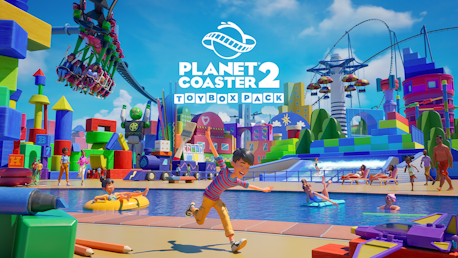
Unbox the fun with the Planet Coaster 2: Toybox Pack! Turn your park into a playful wonderland, with scenery built block-by-block straight from your childhood, featuring five sensational rides sure to delight guests of all ages. From colourful cities packed with larger-than-life toys, to creative arts and crafts areas - anything is possible, all you have to do is imagine it!
Toybox Scenery:
Enter a vivid world born from your imagination, where every corner is filled with colour, nostalgia & fun. Marvel as the heroic Entertainer, Max Stormcloud keeps your park safe from evil (and your guests happy!).
Build towering skyscrapers with bright plastic pieces, stack wooden blocks to construct imaginative buildings, or even make creative use of cardboard to bring your park to life.
Fill your park with fun using a range of new decals, a variety of toy animatronics from robots to aliens, adorable animal blocks, pre-made blueprints and so much more... of course, no toybox would be complete without googly eyes!
Five Delightful New Rides:
A new set of exciting rides are here to play with! Do you find a spot for them straight out of the box, or use your imagination to make them your own?
VECTOR – New-Gen Inverting Suspended Coaster:
Free-flying fun awaits those who brave this fast-paced ride that can be tailored for all audiences. Your guests will soar through the sky while their legs dangle below!
F&N THRILLER INDUSTRIES - Kid Coaster:
A thrill ride for the whole family! Whether you’re a younger rider or a grown-up, this lively steel rollercoaster speaks to the child in all of us.
HIGHROLL:
Less fidgeting, more spinning! Dizzy delights await your guests on this exciting ride with six independently rotating gondola arms that reach high into the sky.
WAVESIM:
Surf’s up! Your guests will be stoked to grab their surfboards for this rad new addition to your waterparks, where they'll catch some gnarly waves on this innovative wave machine.
AIRDROP:
This tall tower ride makes for a perfect visual landmark to draw your guests to an area of your park, and a great view as they yo-yo up and down in their carriage!


FREQUENTLY ASKED QUESTIONS
How does it work? Will I receive Planet Coaster 2: Toybox Pack as a physical copy?
No, you will receive Planet Coaster 2: Toybox Pack product key (Planet Coaster 2: Toybox Pack CD Key), that you will receive by e-mail. Afterwards, you will need to use the Steam-platform to redeem your Planet Coaster 2: Toybox Pack product key (Planet Coaster 2: Toybox Pack CD Key), and you'll be ready to download, install and play Planet Coaster 2: Toybox Pack. You will receive a step-by-step guide on how to do this along with your purchase. It's easy as can be!
Unbox the fun with the Toybox Pack! Turn your park into a playful wonderland packed with five sensational rides, larger-than-life toys, and colourful cities, built block-by-block straight from your childhood.
Genre Simulation Stratégie Solo Multijoueur Contenu téléchargeable Succès Steam Compat. contrôleurs complète Steam Cloud HDR disponible Partage familial
Publisher Frontier Developments
PEGI-rating 
Udvikler Frontier Developments
Platform PC
Sprog Anglais Français Italien Allemand Espagnol - Espagne Tchèque Néerlandais Japonais Coréen Polonais Portugais du Brésil Chinois simplifié Chinois traditionnel
Release date 04-12-2025
System requirements PCMinimale :
- Système d'exploitation et processeur 64 bits nécessaires
Recommandée :
- Système d'exploitation et processeur 64 bits nécessaires
No customer reviews for the moment.