 Contact
  Infocenter
  Login
Login Requires the base game Hunt: Showdown 1896 on Steam in order to use Hunt: Showdown 1896 - Ronin.

 0 Product Products 0 Items
 No products
Your basket contains
0 Product(s) for a total of: 0,00 €
0 Product(s) for a total of: 0,00 €

Product successfully added to your shopping cart
Quantity
Total
There are 0 items in your cart. There is 1 item in your cart.
Total products
Total shipping To be determined
Total
Hunt: Showdown 1896 - Ronin (PC)
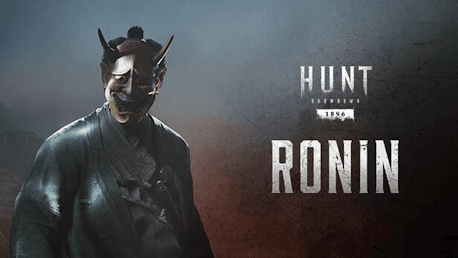
Hunt: Showdown 1896 - Ronin (PC)

Hunt: Showdown 1896 - Ronin CD key to be activated and downloaded via Steam. You will not be sent any physical items in the mail. You will receive a(n) Steam product key via e -mail.

PLEASE NOTE - THIS IS AN EXPANSION PACK
HUNT: SHOWDOWN 1896 - RONIN GAME DESCRIPTION
This DLC contains one Hunter, one Weapon, and one Tool:
- The Ronin (Hunter)
- Seinan Sharpshooter (Springfield 1866)
- The Tanto (Knife)
The Tanto
The Ronin has worn this blade since the day of his oath. During his travels across land and sea, it has been a loyal companion - as keen for fresh blood as its carrier. 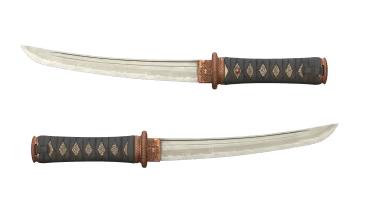
Seinan Sharpshooter
The Ronin briefly fought with the last samurai during the Seinan War, pledging himself to Saigō Takamori. There, he gained notoriety for his deadly use of his Springfield 1866, one of the most advanced weapons on the field. 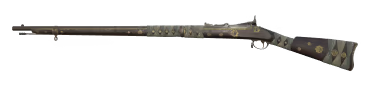
The Ronin
Inuta Bakin had barely sworn his oath of allegiance before the Tokugawa shogunate was disposed. Without a master, he has wandered further than most Ronin, seeking the power to take revenge. Something of a traditionalist, he dresses and fights in a style stretching back centuries, but still effective: his leering Oni mask has been the last sight of many to fall in the bayou.


Hunt: Showdown 1896 © 2024 CRYTEK GMBH. Crytek, CRYENGINE, Hunt: Showdown, Hunt: Showdown 1896 and the respective logos are trademarks or registered trademarks of the Crytek group in the EU, U.S. and/or other territories. All other trademarks are the property of their respective owners. All rights reserved.
FREQUENTLY ASKED QUESTIONS
How does it work? Will I receive Hunt: Showdown 1896 - Ronin as a physical copy?
No, you will receive Hunt: Showdown 1896 - Ronin product key (Hunt: Showdown 1896 - Ronin CD Key), that you will receive by e-mail. Afterwards, you will need to use the Steam-platform to redeem your Hunt: Showdown 1896 - Ronin product key (Hunt: Showdown 1896 - Ronin CD Key), and you'll be ready to download, install and play Hunt: Showdown 1896 - Ronin. You will receive a step-by-step guide on how to do this along with your purchase. It's easy as can be!
This DLC contains one Hunter, one Weapon, and one Tool: - The Ronin (Hunter) - Seinan Sharpshooter (Springfield 1866) - The Tanto (Knife)
Genre Action Multi-player Online PvP Co-op Online Co-op Downloadable Content Steam Achievements Full controller support Steam Trading Cards In-App Purchases Steam Leaderboards Remote Play on TV
Publisher CryTek
PEGI-rating 
Developer Crytek
Platform PC
Language English French Italian German Spanish - Spain Portuguese - Portugal Russian Simplified Chinese Polish Turkish Japanese Portuguese - Brazil
Multiplayer Yes
Release date 14-12-2020
System requirements Read moreNo customers reviews at the moment.