 Contact
  Infocenter
  Login
Login Requires the base game Meet Your Maker on Steam in order to use Meet Your Maker - Scorched Necropolis DLC.

 0 Product Products 0 Items
 No products
Your basket contains
0 Product(s) for a total of: 0,00 €
0 Product(s) for a total of: 0,00 €

Product successfully added to your shopping cart
Quantity
Total
There are 0 items in your cart. There is 1 item in your cart.
Total products
Total shipping To be determined
Total
Meet Your Maker - Scorched Necropolis DLC (PC)
Meet Your Maker - Scorched Necropolis DLC (PC)

Meet Your Maker - Scorched Necropolis DLC CD key to be activated and downloaded via Steam. You will not be sent any physical items in the mail. You will receive a(n) Steam product key via e -mail.

PLEASE NOTE - THIS IS AN EXPANSION PACK
MEET YOUR MAKER - SCORCHED NECROPOLIS DLC GAME DESCRIPTION
It rises from the rust-colored sands: an ancient Outpost unlike any in the wasteland, shimmering against the desert sun...
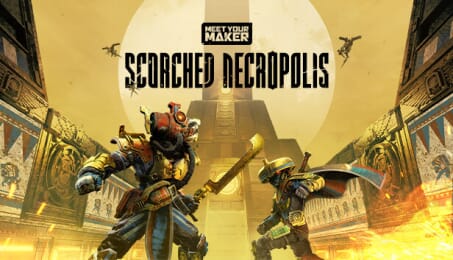
Featuring designs and architecture inspired by ancient Egypt, Meet Your Maker’s Scorched Necropolis Collection combines myth and machine to create post-apocalyptic tombs where gilded Raiders can find either glory – or their final resting place.
The Scorched Necropolis Collection contains:
1 Deco Pack:
2 Blocks (each available in 3 shapes)
- Limestone
- Golden Age Use these sand-word slabs to build as they did in ancient times. 2 Props
- Winged Molding
- Temple Light Add to your Outpost’s atmosphere with arcane patterns and ominous lighting.1 Animated Prop
- Spinning Enigma Strategically place this mysterious spinning symbol to sow dread or distract Raiders.8 Decals Inscribe the halls of your Outpost with designs inspired by Egyptian hieroglyphs.
1 Weapon Skin
- Sunclaw A skin that turns the Fury’s Edge into a golden blade, inspired by the Egyptian khopesh.
2 Custodian Skins
- Desert Cyclops
- Gilded Warrior Skins that adorn Ironside and Kamaitachi with ornate golden features worthy of the Gods.
*All items in Meet Your Maker can be mixed and matched freely when building an Outpost or creating a Raider loadout.
FREQUENTLY ASKED QUESTIONS
How does it work? Will I receive Meet Your Maker - Scorched Necropolis DLC as a physical copy?
No, you will receive Meet Your Maker - Scorched Necropolis DLC product key (Meet Your Maker - Scorched Necropolis DLC CD Key), that you will receive by e-mail. Afterwards, you will need to use the Steam-platform to redeem your Meet Your Maker - Scorched Necropolis DLC product key (Meet Your Maker - Scorched Necropolis DLC CD Key), and you'll be ready to download, install and play Meet Your Maker - Scorched Necropolis DLC. You will receive a step-by-step guide on how to do this along with your purchase. It's easy as can be!
Meet Your Maker’s Scorched Necropolis Collection invites players to build and raid Outposts worthy of the Pharaohs themselves. Use ancient-Egyptian-inspired blocks, props, weapons, and Custodian Suits to create and infiltrate monumental tombs unlike any in the wasteland.
Genre Action Strategy Single-player Multi-player Co-op Online Co-op Downloadable Content Full controller support Family Sharing
Publisher Behaviour Interactive Inc.
Developer Behaviour Interactive Inc.
Platform PC
Language English French Italian German Spanish - Spain Japanese Simplified Chinese Traditional Chinese Ukrainian Korean Polish Portuguese - Brazil Portuguese - Portugal Spanish - Latin America
Release date 04-04-2023
System requirements Read moreNo customers reviews at the moment.