
 Contact
  Infocenter
  Login
Login  0 Product Products 0 Items
 No products
0 Product(s) for a total of: 0,00 €

Moonlight Peaks (PC)

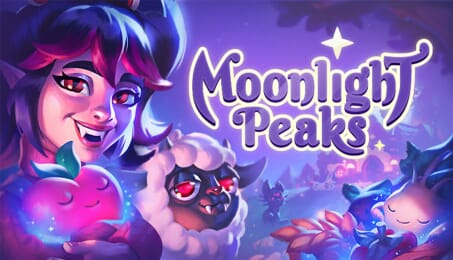
Experience life as a vampire in a magical town full of werewolves, witches, mermaids, and more! In this heartwarming, supernatural life-sim, you will raise mystical crops, learn spell-casting and potion-making, and befriend – or even romance – the locals. And at the same time, show your skeptical father that a life of compassion is possible – even for the undead.
Settle down in your family’s abandoned homestead and make it your own. Build your farm with magic crops and livestock, customize your cottage with gothic style, and make friends with other creatures of the night. Embrace immortality and unlock ancient abilities, all in the name of a more bountiful harvest. Unravel the mysteries of the seven families that inhabit Moonlight Peaks and bring a bit of light back to this spooky settlement. Just remember to be back in your coffin before the sun comes up!

Customize your perfect vampire persona and build relationships with the people of Moonlight Peaks to learn more about the town’s history. Uncover the secrets of the seven families who dwell there – and maybe even find your “tomb” love from any of the two dozen romanceable characters in the process.

Design your cozy gothic homestead, turning a forgotten farm into the ideal sanctuary. Obtain new tools and develop your property to grow even more enchanted crops and raise magical livestock.

Embrace your supernatural lineage! Shapeshift into other forms to explore all the town has to offer, and study witchcraft to learn spells that will help you on the farm or when gathering resources.

Beyond the farm, you’ll be able to enjoy fishing, foraging, and potion-crafting, along with activities like embroidering, flower arranging, and more. You can even collect cards for the town’s favorite game, Nokturna, to play against other residents.
Legal Information
How does it work? Will I receive Moonlight Peaks as a physical copy?
No, you will receive Moonlight Peaks product key (Moonlight Peaks CD Key), that you will receive by e-mail. Afterwards, you will need to use the Steam-platform to redeem your Moonlight Peaks product key (Moonlight Peaks CD Key), and you'll be ready to download, install and play Moonlight Peaks. You will receive a step-by-step guide on how to do this along with your purchase. It's easy as can be!
Welcome to your new vampiric life in the magical town of Moonlight Peaks. Raise mystical crops, learn spell-casting and potion-making, and befriend – or even romance – the local werewolves, witches, and mermaids in this heartwarming supernatural life-sim. Eternity awaits!
No customers reviews at the moment.