
 Contact
  Infocenter
  Login
Login  0 Product Products 0 Items
 No products
0 Product(s) for a total of: 0,00 €

ONE PIECE: Grand Gourmet (PC)

Preorder
Release date: Friday 23 Oct, 2026 - 79 days left

23. October 2026
Be ready to play ONE PIECE: Grand Gourmet on release day! When you preorder, the payment will not be charged until the order has been delivered. Your product key will be sent on release day at the latest, but usually 1-2 days before.
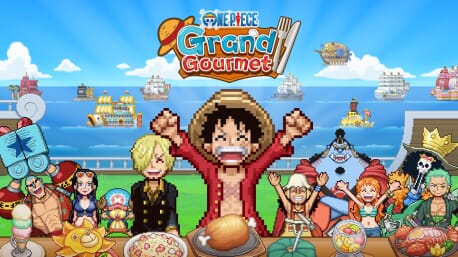
ONE PIECE comes to life as a restaurant management sim game!
As a new staff member, work alongside the Straw Hat Crew to turn the second location of the renowned Baratie floating restaurant into the greatest restaurant of the seas!
Dish Out a Signature Menu
Get inspired by characters' ideas, choose your ingredients, and work with Sanji to cook delicious dishes. Arrange them into unique meal sets by adding different flourishes, then adventure to find even more recipes! From iconic series favorites like Water-Water Meat BBQ and Sea King Penne Gorgonzola to special creations that harness the powers of Devil Fruits, a treasure trove of dishes awaits.
Design A Tasteful Interior
Choose from over 200 furniture, building, and decorative items to make your restaurant uniquely yours! From dessert-themed Whole Cake Island pieces to futuristic Egghead items, the customization options are as vast as the sea. If a character likes your design, they may even become a regular!
Table for 400
From the Straw Hat Crew and beyond, over 400 ONE PIECE characters appear as staff and customers in a spritely pixel style for the first time in a game! With so many characters, you'll experience character events and special character interactions that can’t be found anywhere else.
*Screenshots may not reflect final product.


How does it work? Will I receive ONE PIECE: Grand Gourmet as a physical copy?
No, you will receive ONE PIECE: Grand Gourmet product key (ONE PIECE: Grand Gourmet CD Key), that you will receive by e-mail. Afterwards, you will need to use the Steam-platform to redeem your ONE PIECE: Grand Gourmet product key (ONE PIECE: Grand Gourmet CD Key), and you'll be ready to download, install and play ONE PIECE: Grand Gourmet. You will receive a step-by-step guide on how to do this along with your purchase. It's easy as can be!
Hop aboard a delectable management sim in the world of ONE PIECE!
Work alongside the Straw Hat Crew to build the greatest floating restaurant of the seas. Collect ingredients, dream up dishes, and decorate to have familiar faces lining up for more!
Minimum:
- Requires a 64-bit processor and operating system
- Additional Notes: TBA
Recommended:
- Requires a 64-bit processor and operating system
- Additional Notes: TBA
No customers reviews at the moment.