 Contact
  Infocenter
  Login
Login Requires the base game Monster Hunter Wilds on Steam in order to use Monster Hunter Wilds Extras Cosmetic DLC Pack.

 0 Product Products 0 Items
 No products
Your basket contains
0 Product(s) for a total of: 0,00 €
0 Product(s) for a total of: 0,00 €

Product successfully added to your shopping cart
Quantity
Total
There are 0 items in your cart. There is 1 item in your cart.
Total products
Total shipping To be determined
Total
Monster Hunter Wilds Extras Cosmetic DLC Pack (PC)
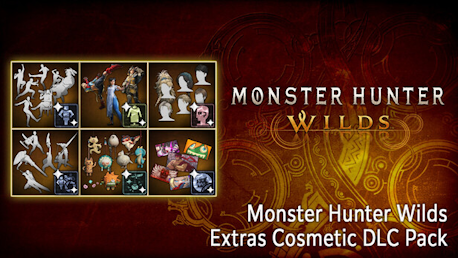
Monster Hunter Wilds Extras Cosmetic DLC Pack (PC)

Monster Hunter Wilds Extras Cosmetic DLC Pack CD key to be activated and downloaded via Steam. You will not be sent any physical items in the mail. You will receive a(n) Steam product key via e -mail.
PLEASE NOTE - THIS IS AN EXPANSION PACK
MONSTER HUNTER WILDS EXTRAS COSMETIC DLC PACK GAME DESCRIPTION
*Content in this set can be purchased individually and as part of other packs. Please be careful not to purchase the same item twice.
*There are other bundles that include this product. Please be careful of duplicate purchases.
*You may need to update to the latest version of the game to use this content.
Spruce up your Hunter experience with this pack!
Please check the official Monster Hunter Wilds website for more detail.
Includes:
3 Alma Outfit
1 Photo Pose Set
7 Gestures
1 Gesture Set
9 Pendants
4 Pendant Sets
1 Sticker Set
6 Hairstyles
1 Camp Gear Set
【Premium Bonus】
・Hunter Layered Armor: Wyverian Ears
・Premium Bonus Hunter Profile Set
・BGM: Proof of a Hero (2025 Recording)
©CAPCOM
MONSTER HUNTER WILDS is a trademark and/or registered trademark of CAPCOM CO., LTD. and/or its subsidiaries in the U.S. and/or other countries.
FREQUENTLY ASKED QUESTIONS
How does it work? Will I receive Monster Hunter Wilds Extras Cosmetic DLC Pack as a physical copy?
No, you will receive Monster Hunter Wilds Extras Cosmetic DLC Pack product key (Monster Hunter Wilds Extras Cosmetic DLC Pack CD Key), that you will receive by e-mail. Afterwards, you will need to use the Steam-platform to redeem your Monster Hunter Wilds Extras Cosmetic DLC Pack product key (Monster Hunter Wilds Extras Cosmetic DLC Pack CD Key), and you'll be ready to download, install and play Monster Hunter Wilds Extras Cosmetic DLC Pack. You will receive a step-by-step guide on how to do this along with your purchase. It's easy as can be!
Genre Action Adventure RPG Single-player Multi-player Co-op Online Co-op Cross-Platform Multiplayer Downloadable Content Steam Achievements Full controller support Steam Trading Cards DualShock Controller Support DualSense Controller Support Steam Input API Support Steam Cloud HDR available Family Sharing
Publisher CAPCOM Co., Ltd.
PEGI-rating 
Developer CAPCOM Co., Ltd.
Platform PC
Language English French Italian German Spanish - Spain Arabic Spanish - Latin America Portuguese - Brazil Polish Russian Simplified Chinese Traditional Chinese Japanese Korean Thai
System requirements PCMinimum:
- Requires a 64-bit processor and operating system
Recommended:
- Requires a 64-bit processor and operating system
No customers reviews at the moment.