 Contact
  Infocenter
  login
login Requires the base game Cult of the Lamb on Steam in order to use Cult of the Lamb: Woolhaven.

 0 Product Products 0 Vare
 No products
Your basket contains
0 Product(s) for a total of: 0,00 €
0 Product(s) for a total of: 0,00 €

Product successfully added to your shopping cart
Quantity
Total
There are 0 items in your cart. There is 1 item in your cart.
Total products
Total shipping To be determined
Total
Cult of the Lamb: Woolhaven (PC)
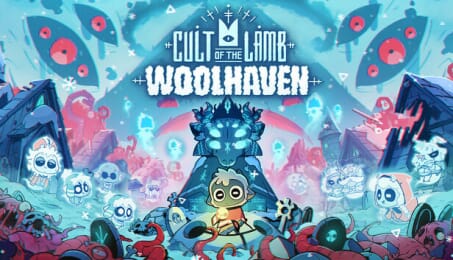
Cult of the Lamb: Woolhaven (PC)

Cult of the Lamb: Woolhaven CD key to be activated and downloaded via Steam. You will not be sent any physical items in the mail. You will receive a(n) Steam product key via e -mail.
Additional content!
CULT OF THE LAMB: WOOLHAVEN GAME DESCRIPTION
NOTE: The content of this expansion is only accessible near completion of the base game.
Winter descends, and a long-silenced deity stirs beneath the snow.
Yngya, the forgotten God of the lambs, summons you to restore the flock and reclaim what time has erased. But as you breathe life into what long passed, a creeping Rot awakens, spreading corruption through the sacred mountain the lambs once called home…
Not all who tread this peak come seeking redemption. Upon the frozen summit, a wolf prowls — his pack hungers for war with the covetous Gods. Deep within the hidden caverns, a shadowy figure waits, blade honed and patience fraying. Restless spirits drift along the ridges, each bound by former sins. The past was buried for good reason — will you unearth it, or will it consume you?
That which was sacred now rots, and nothing is as it seems. Last of the lambs, Woolhaven’s fate rests in your hooves.
Discover Woolhaven
Return the lost souls of Woolhaven to their spiritual home and learn the long-forgotten history of lambkind. Rebuild the fallen town to its former glory and reclaim the mountain to restore Yngya’s depleted power, but beware; there is always a price to be paid.
Survive the Winter
Endure harsh blizzards and freezing temperatures that threaten your Cult’s survival. Build new structures to keep your Cult warm and protect your Followers from frostbite and famine.
Explore The Mountain
Venture into a new realm battered by bitter storms, crawling with creatures corrupted with the Rot lurking beneath the snow. Battle through two vast new dungeons, where the echoes of the past refuse to rest. Every soul redeemed on the mountain defiles it further, threatening all of The Lands of the Old Faith. Can you undo the sins of the past?
Take up Ranching
Unlock ranching and breed rare animals that provide wool, warmth and when desperate, precious meat. Tame, ride and let your Followers care for these majestic creatures.


FREQUENTLY ASKED QUESTIONS
How does it work? Will I receive Cult of the Lamb: Woolhaven as a physical copy?
No, you will receive Cult of the Lamb: Woolhaven product key (Cult of the Lamb: Woolhaven CD Key), that you will receive by e-mail. Afterwards, you will need to use the Steam-platform to redeem your Cult of the Lamb: Woolhaven product key (Cult of the Lamb: Woolhaven CD Key), and you'll be ready to download, install and play Cult of the Lamb: Woolhaven. You will receive a step-by-step guide on how to do this along with your purchase. It's easy as can be!
A lost God calls you from a mysterious mountain—rebuild the flock and reawaken winter to uncover the truth of the fallen lambs. Face the past before it consumes you in this full-length expansion for Cult of the Lamb.
Genre Action Adventure Indie Strategy Single-player Multi-player Co-op Shared/Split Screen Co-op Shared/Split Screen Downloadable Content Steam Achievements Full controller support Steam Trading Cards Steam Cloud Remote Play Together Family Sharing
Publisher Devolver Digital
Udvikler Massive Monster
Sprog Engelsk Fransk Tysk Spanish - Spain Japansk Koreansk Portuguese - Brazil Russisk Simplified Chinese Traditional Chinese
Release date 22-01-2026
System requirements Read moreNo customer reviews for the moment.