
 Contact
  Infocenter
  login
login  0 Product Products 0 Vare
 No products
0 Product(s) for a total of: 0,00 €

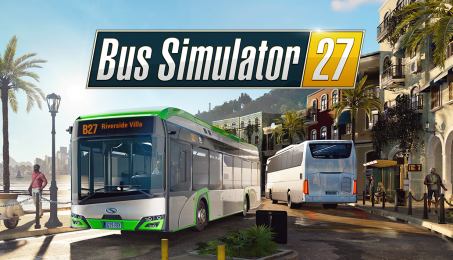
Bus Simulator 27 (PC)

Preorder
Release date: Tuesday 08 Sep, 2026 - 33 days left

8. September 2026
Be ready to play Bus Simulator 27 on release day! When you preorder, the payment will not be charged until the order has been delivered. Your product key will be sent on release day at the latest, but usually 1-2 days before.
Pre-Order the Bus Simulator 27 and get the Deluxe Pack for free! Offer ends with launch of the game.
Look forward to the most comprehensive and advanced bus fleet in the history of the series so far. More than 45 officially licensed buses from 13 world-famous manufacturers, such as Solaris™, Mercedes-Benz, MAN, IVECO BUS, Scania, and Volvo, are waiting for you to drive. Whether you are interested in classic rigid, articulated, and double-decker buses or in new electric buses – Bus Simulator 27 has got you covered. And for the first time ever in the series, you can get behind the wheel of impressive coach buses and enjoy long-distance journeys!
Felicia Bay is the perfect place to work where others go on vacation – a sunny fictive region in Southern Europe inspired by Spain and Portugal. Explore the vibrant twin cities of Alcaztelar and Mequina, featuring 20 unique districts packed with exciting landmarks – all brought to life by dynamic weather, a full day and night cycle, and bustling, crowded streets powered by Unreal® Engine 5. Create and serve routes, manage timetables, hire bus drivers, assign lines, customize buses with wraps and advertisements, and restore faith in public transportation in the local residents and visiting tourists.
Discover three different game modes and play the way you prefer: Story, Career, and Sandbox. Enjoy your time on the bus interacting with passengers. Watch out for in-bus and traffic events that may occur during your journey. And if you need a bit of variety, play as an inspector or take a ride as a passenger. You can also just exit the bus and explore Felicia Bay on foot to search for stunning points of interest and hidden collectibles.
Play solo or with your friends across all platforms in 4-player cooperative multiplayer crossplay mode. Coordinate routes and manage your bus fleet together and grow your company. Plus, mod your Bus Simulator 27 experience with mod.io on PC! Bus Simulator 27 supports a host of popular steering wheels and gamepads to make your ride as enjoyable as possible.
Jump aboard and let’s Ride the Sunshine!
Features:
- BIGGEST BUS FLEET YET: 45+ buses from 13 renowned manufacturers
- NEW BUS TYPE: Drive licensed coach buses
- ONLY YOU: Enjoy the game at your pace
- WITH FRIENDS: cooperatively with up to 4 players
- FULL CROSSPLAY: No one is left behind
- 3 GAME MODES: Story, Career, & Sandbox
- YOUR ROLES: Play as a driver, inspector, or passenger
- IN-BUS EVENTS: Look after your passengers
- HEAVY TRAFFIC: Deal with accidents and more on your routes
- RIDE THE SUNSHINE: Explore Felicia Bay, a southern European paradise
- HUGE MAP: With 2 cities, 20 districts and beautiful landscapes
- MANAGER: Run your company and enjoy extensive management options
- MODDING: Expandable with mod.io mods on PC
- PERIPHERALS: Supports popular steering wheels and gamepads

How does it work? Will I receive Bus Simulator 27 as a physical copy?
No, you will receive Bus Simulator 27 product key (Bus Simulator 27 CD Key), that you will receive by e-mail. Afterwards, you will need to use the Steam-platform to redeem your Bus Simulator 27 product key (Bus Simulator 27 CD Key), and you'll be ready to download, install and play Bus Simulator 27. You will receive a step-by-step guide on how to do this along with your purchase. It's easy as can be!
Drive officially licensed buses from renowned manufacturers and manage your bus company to success. Felicia Bay’s public transportation system is counting on you!
No customer reviews for the moment.