
 Kontakta oss
  Infocenter
  Logga in
  0 Produkt Produkter 0 Vara
 Inga produkter
0 Produkt(er) för totalt: 0,00 €

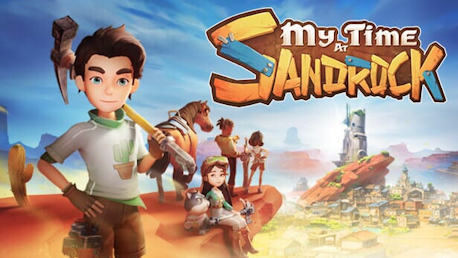
My Time at Sandrock (PC)

My Time at Sandrock-Just like My Time at Portia, My Time at Sandrock takes place in a wholesome post-apocalyptic world 330 years after the Day of Calamity destroyed most modern technologies.
After accepting a job offer to become Sandrock’s newest Builder, you’ll arrive in the wild and rugged city-state, where it’s up to you and your trusty tools to restore the community to its former glory. Gather resources to build machines, befriend locals, and defend Sandrock from monsters — all while saving the town from economic ruin!
Key Features

Transform a run-down workshop into a well-oiled production facility! Use an intricate set of machines to process materials and produce parts of huge structures before assembling them piece by piece to help Sandrock flourish.
Create hundreds of unique items at the worktable to decorate your homestead, give gifts to Sandrock’s residents, or assist with community requests.

Explore vast deserts surrounding the city-state of Sandrock. Dive into ruins to dig for Old World relics, seek our materials in hard-to-reach locations, or spend time relaxing in Sandrock with your neighbors.

Experience a detailed story complete with hundreds of sidequests and over 30 all-new characters. Spend time getting to know Sandrock’s residents, uncovering backstories, and making meaningful connections along the way.

Quickly shift between melee combat and third-person shooting mechanics in dynamic action battles.Use the new weapons and defense break mechanic to your tactical advantage, or boost your stats to simply smash through battles!

A diversity of mini-games allow you and local Sandrock residents to stay entertained in the desert town.

Explore, build, and battle with up to 4 players. Together, shape the dynamic town, construct towering structures, engage in battles, share romantic moments, and dive into mini-games. Every move counts, earning points and unlocking new dimensions for your evolving character.

Use your workshop’s profits to turn the empty prairie into farmable land;
Grow crops for extra cash or transform them into delicious dishes;
Attend festivals with Sandrock’s residents;
Find secrets and much more!
Both Portians and brand-new Builders who have never set foot in Portia will find a fun new world with lots to explore at their own pace, along with divergent NPC stories to enhance replayability. Experienced Builders will find everything you enjoyed about My Time at Portia and more, and you will feel right at home in the delightful life-sim RPG that is My Time at Sandrock.


©2023 My Time at Sandrock, a game developed by Pathea Games and published by Pathea Games, Focus Entertainment, PM Studio, and DMM Studio. Their respective logos are trademarks or registered trademarks. All rights reserved.
Hur fungerar det? Får jag My Time at Sandrock som en fysisk kopia?
Nej, du får My Time at Sandrock produktnyckel (My Time at Sandrock CD Key), som du får via e-post. Sedan måste du använda Steam-plattformen för att lösa in dina My Time at Sandrock produktnyckel (My Time at Sandrock CD Key), och du är redo att ladda ner, installera och spela My Time at Sandrock. Du får en steg-för-steg guide om hur du gör detta tillsammans med ditt köp. Det är hur enkelt som helst!
Travel to the desert community of Sandrock and take on the role of a fledgling Builder. Use your trusty toolset to gather resources, construct machines, and turn your run-down workshop into a well-oiled production facility to save the town from the jaws of economic ruin!

Inga kundomdömen för tillfället.