 Contact
  Infocenter
  login
login Requires the base game Dead by Daylight on Steam in order to use Dead by Daylight - Nicolas Cage Chapter Pack.

 0 Artikel Artikel 0 Vare
 Keine Artikel
Your basket contains
0 Product(s) for a total of: 0,00 €
0 Product(s) for a total of: 0,00 €

Artikel wurde in den Korb gelegt
Menge
Gesamt
Sie haben 0 Artikel in Ihrem Warenkorb. Es gibt 1 Artikel in Ihrem Warenkorb.
Gesamt Artikel
Versandkosten noch festzulegen
Gesamt
Dead by Daylight - Nicolas Cage Chapter Pack (PC)
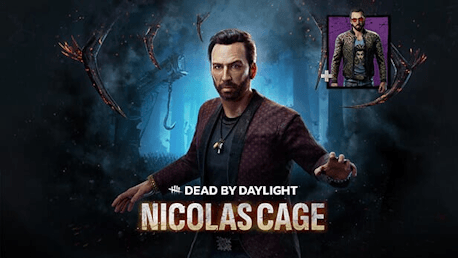
Dead by Daylight - Nicolas Cage Chapter Pack (PC)

Dead by Daylight - Nicolas Cage Chapter Pack CD key to be activated and downloaded via Steam. You will not be sent any physical items in the mail. You will receive a(n) Steam product key via e -mail.

Additional content!
DEAD BY DAYLIGHT - NICOLAS CAGE CHAPTER PACK GAME DESCRIPTION
Prepare for a tour de force performance. Dead by Daylight’s Nicolas Cage Chapter Pack features a new Survivor, legendary actor Nicolas Cage in his deadliest role yet. Purchasing this add-on unlocks an exclusive Cosmetic: Teal Jacket as well as the Very Rare Gorgon Drip Outfit for Nicolas Cage.
NICOLAS CAGE
Countless awards. Over one hundred films. Nicolas Cage had done it all and seen it all...or so he thought. When a mysterious screenplay for “Descend Beyond” landed on his desk, he signed on without hesitation. While filming, Nick performed his dialogue with gravitas, a dark incantation that rolled off his tongue with ease. He dipped his fingers in a cup of red ink and painted symbols on the stone altar. He was so immersed he barely noticed the tendrils of black Fog slowly creeping toward him...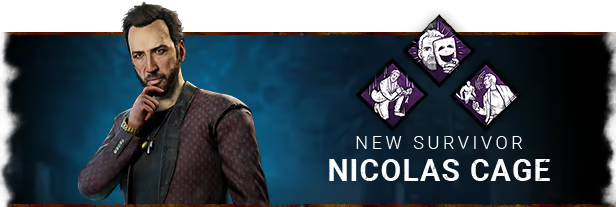
Nicolas Cage comes with 3 new perks.
Dramaturgy
When healthy, press the active ability button to activate Dramaturgy while running to gain a brief vaulting speed boost. Immediately afterward, one of 4 random effects will occur: Briefly become Exposed, move slightly faster for a few seconds, let out a scream, or drop your Item to gain a Firecracker. This Perk causes the Exhaustion status effect and cannot be used while Exhausted.
Scene Partner
When in the Killer’s Terror Radius, look in the Killer’s direction to scream and receive a brief view of their Aura. Be warned, however – there is a slight chance you’ll scream once more.
Plot Twist
When injured, press the active ability button while crouched to willingly enter the Dying State. During this time, you will remain silent and leave no Blood Pools. From there, you can recover on your own to become Broken for a brief duration, and then fully healed.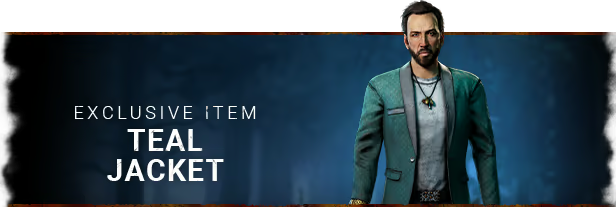
EXCLUSIVE CHAPTER SURVIVOR ITEM: THE TEAL JACKET
The Nicolas Cage Chapter Pack includes an exclusive item: Teal Jacket. A sophisticated teal smoking jacket, the finest in his wardrobe.
Please note that this item cannot be purchased separately.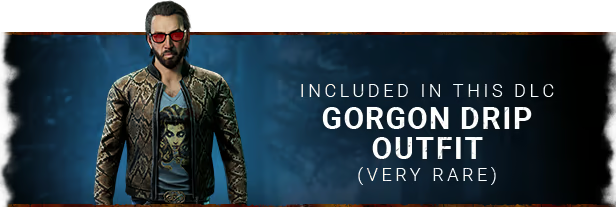
The Nicolas Cage Chapter Pack also includes a Very Rare Outfit: Gorgon Drip. A mythological outfit for a larger-than-life celebrity.
This is his deadliest role yet.


FREQUENTLY ASKED QUESTIONS
How does it work? Will I receive Dead by Daylight - Nicolas Cage Chapter Pack as a physical copy?
No, you will receive Dead by Daylight - Nicolas Cage Chapter Pack product key (Dead by Daylight - Nicolas Cage Chapter Pack CD Key), that you will receive by e-mail. Afterwards, you will need to use the Steam-platform to redeem your Dead by Daylight - Nicolas Cage Chapter Pack product key (Dead by Daylight - Nicolas Cage Chapter Pack CD Key), and you'll be ready to download, install and play Dead by Daylight - Nicolas Cage Chapter Pack. You will receive a step-by-step guide on how to do this along with your purchase. It's easy as can be!
Prepare for a tour de force performance. Dead by Daylight’s Nicolas Cage Chapter Pack features a new Survivor, legendary actor Nicolas Cage in his deadliest role yet. Purchasing this add-on unlocks an exclusive Cosmetic: Teal Jacket as well as the Very Rare Gorgon Drip outfit for Nicolas Cage.
Genre Action Multi-player PvP Online PvP Co-op Online Co-op Cross-Platform Multiplayer Downloadable Content Steam Achievements Full controller support Steam Trading Cards Steam Cloud Remote Play on Phone Remote Play on Tablet Remote Play on TV Family Sharing
PEGI-rating 
Udvikler Behaviour Interactive Inc.
Platform PC
Sprog Engelsk Fransk Italiensk Tysk Spanish - Spain Russisk Simplified Chinese Portuguese - Brazil Thai Traditional Chinese Japansk Koreansk Polsk Spanish - Latin America Turkish
Release date 25-07-2023
System requirements Read moreNo customer reviews for the moment.