 Contact
  Infocenter
  login
login Requires the base game Hunt: Showdown 1896 on Steam in order to use Hunt: Showdown 1896 - The Phantom.

 0 商品 商品 0 Vare
 商品がありません
Your basket contains
0 Product(s) for a total of: 0,00 €
0 Product(s) for a total of: 0,00 €

カートに商品が追加されました。
数量
合計
カートに商品が 0 点入っています。 カートに商品が 1 点入っています。
小計
送料 後に決定されます
合計
Hunt: Showdown 1896 - The Phantom (PC)
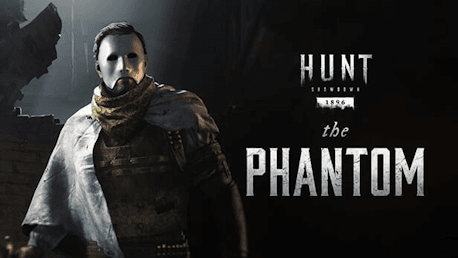
Hunt: Showdown 1896 - The Phantom (PC)

Hunt: Showdown 1896 - The Phantom CD key to be activated and downloaded via Steam. You will not be sent any physical items in the mail. You will receive a(n) Steam product key via e -mail.

Additional content!
HUNT: SHOWDOWN 1896 - THE PHANTOM GAME DESCRIPTION
This DLC contains one Hunter:
- The Phantom (Hunter)
The Phantom
Gus Leroux: A former lawyer with a penchant for violence, this theatrical Hunter covers his scarred visage with a mask—not because he is ashamed of the injuries beneath, but because it terrifies his opponents."


FREQUENTLY ASKED QUESTIONS
How does it work? Will I receive Hunt: Showdown 1896 - The Phantom as a physical copy?
No, you will receive Hunt: Showdown 1896 - The Phantom product key (Hunt: Showdown 1896 - The Phantom CD Key), that you will receive by e-mail. Afterwards, you will need to use the Steam-platform to redeem your Hunt: Showdown 1896 - The Phantom product key (Hunt: Showdown 1896 - The Phantom CD Key), and you'll be ready to download, install and play Hunt: Showdown 1896 - The Phantom. You will receive a step-by-step guide on how to do this along with your purchase. It's easy as can be!
This DLC contains one Hunter: - The Phantom (Hunter)
Genre Action Multi-player PvP Online PvP Co-op Online Co-op Downloadable Content Steam Achievements Full controller support Steam Trading Cards In-App Purchases Steam Leaderboards
Publisher CryTek
PEGI-rating 
Udvikler Crytek
Platform PC
Sprog Engelsk Fransk Italiensk Tysk Spanish - Spain Portuguese - Portugal Russisk Simplified Chinese
Release date 17-10-2019
System requirements Read moreNo customer reviews for the moment.