 Contact
  Infocenter
  login
login Requires the base game Farming Simulator 25 on Steam in order to use Farming Simulator 25: Mercedes-Benz Trucks Pack.

 0 商品 商品 0 Vare
 商品がありません
Your basket contains
0 Product(s) for a total of: 0,00 €
0 Product(s) for a total of: 0,00 €

カートに商品が追加されました。
数量
合計
カートに商品が 0 点入っています。 カートに商品が 1 点入っています。
小計
送料 後に決定されます
合計
Farming Simulator 25: Mercedes-Benz Trucks Pack (PC)
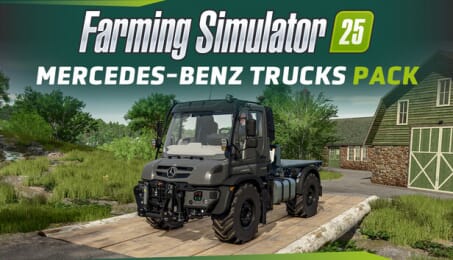
Farming Simulator 25: Mercedes-Benz Trucks Pack (PC)

Farming Simulator 25: Mercedes-Benz Trucks Pack CD key to be activated and downloaded via Steam. You will not be sent any physical items in the mail. You will receive a(n) Steam product key via e -mail.

Additional content!
FARMING SIMULATOR 25: MERCEDES-BENZ TRUCKS PACK GAME DESCRIPTION
Align your farming operation with the stars of Mercedes-Benz and our brand-new partner Daimler Truck AG! Get 17 machines and implements, featuring the renowned manufacturer’s most iconic flagship trucks - and more!
Iconic Trucks & Tools
Highlights of the pack include the famous Unimog, Mercedes-Benz’s celebrated all-rounder, and the MB-trac, famous powerhouse of traction and durability. They’re joined by top-tier trucks like the Actros L and Arocs. Various vehicle configurations allow you to customize them to fit the needs of your agricultural business.
6 Brands, 3 Debuts
The pack also includes the Heizotruck V2, based on the 4x4 Mercedes-Benz Arocs, from returning manufacturer Heizomat, as well as the TECTRUM RS21 roll-off tipper by Meiller,
making its debut in the series. New brands Sirch and Alliance also join, while familiar names like Fliegl and Stoll also return with new equipment to round off the Mercedes-Benz Trucks Pack.


FREQUENTLY ASKED QUESTIONS
How does it work? Will I receive Farming Simulator 25: Mercedes-Benz Trucks Pack as a physical copy?
No, you will receive Farming Simulator 25: Mercedes-Benz Trucks Pack product key (Farming Simulator 25: Mercedes-Benz Trucks Pack CD Key), that you will receive by e-mail. Afterwards, you will need to use the Steam-platform to redeem your Farming Simulator 25: Mercedes-Benz Trucks Pack product key (Farming Simulator 25: Mercedes-Benz Trucks Pack CD Key), and you'll be ready to download, install and play Farming Simulator 25: Mercedes-Benz Trucks Pack. You will receive a step-by-step guide on how to do this along with your purchase. It's easy as can be!
Align your farming business with the stars of Mercedes-Benz and Daimler Truck AG! The Mercedes-Benz Trucks Pack includes 17 machines and tools.
Genre Simulation Single-player Multi-player Co-op Online Co-op Downloadable Content Steam Achievements Full controller support DualShock Controller Support Steam Cloud Family Sharing
Publisher Giants Software
PEGI-rating 
Udvikler Giants Software
Sprog Engelsk Fransk Italiensk Tysk Spanish - Spain Czech Dansk Hollandsk Finsk Hungarian Japansk Koreansk Norsk Polsk Portuguese - Brazil Portuguese - Portugal Romanian Russisk Simplified Chinese Spanish - Latin America Svensk Traditional Chinese Turkish Ukrainian Vietnamese Indonesian
Release date 09-09-2025
System requirements Read moreNo customer reviews for the moment.