 Contact
  Infocenter
  login
login Requires the base game Hunt: Showdown 1896 on Steam in order to use Hunt: Showdown 1896 - Bones and Bounties.

 0 Product Products 0 Vare
 No products
Your basket contains
0 Product(s) for a total of: 0,00 €
0 Product(s) for a total of: 0,00 €

Product successfully added to your shopping cart
Quantity
Total
There are 0 items in your cart. There is 1 item in your cart.
Total products
Total shipping To be determined
Total
Hunt: Showdown 1896 - Bones and Bounties (PC)
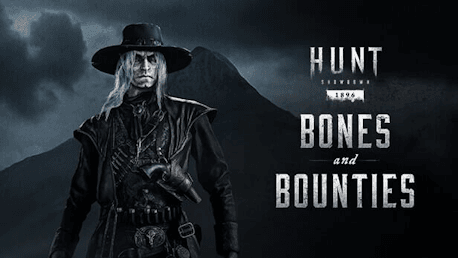
Hunt: Showdown 1896 - Bones and Bounties (PC)

Hunt: Showdown 1896 - Bones and Bounties CD key to be activated and downloaded via Steam. You will not be sent any physical items in the mail. You will receive a(n) Steam product key via e -mail.

Additional content!
HUNT: SHOWDOWN 1896 - BONES AND BOUNTIES GAME DESCRIPTION
This DLC contains one Hunter, two Weapons skins, and one Tool skin:
- Silver Spur (Hunter)
- Yawning Grave (Mako 1895 Carbine)
- Dry Bones (Caldwell Conversion Uppercut Precision)
- Grave Robber (Weak Vitality Shot)
Silver Spur
A walking dead man they call Silver Spur, Ezekiel Stringfellow has hunted his fellow man all his life. Cursed by illness to wander, he followed a vision to the Hunt, where his keen eye and steady hand have made him a formidable foe.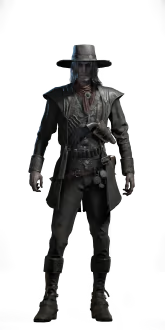
Yawning Grave
Death claims its victims from afar with this Mako 1895 Carbine. The distinctive click of its lever action is one of the last sounds its victims will hear, and one can almost see the fleshless grin of the skeleton carved into the stock grow wider… 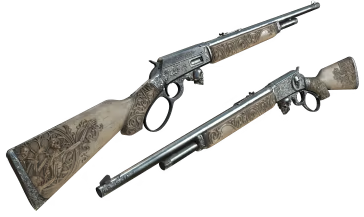
Dry Bones
Not for the weak of heart or the weak of grip, the Caldwell Conversion Uppercut Precision recoils like an angry snake when fired. When asked if the bone worked into its making was human or animal, the gunsmith just smiled. 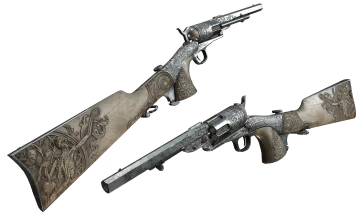
Grave Robber
Long favored by Hunters with physical infirmities, this Weak Vitality Shot alleviates momentary pain and revitalizes the Hunter who takes it. What’s in it remains a subject of much fearful debate. 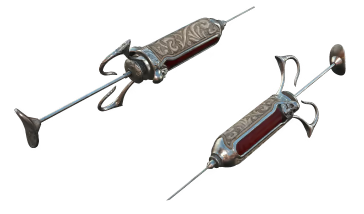
Ezekiel Stringfellow was a bounty hunter by trade, and a good one. He had the wiry strength of a sidewinder and he never, ever let his target get away. Once Stringfellow was on the trail, his man was as good as captured—or dead.
Truth be told, he preferred the latter, as dead men didn’t talk, and he was a solitary and silent man by nature. Even if his target surrendered, Stringfellow would like as not shoot him. The lesser bounty for bring proof of a corpse didn’t matter to him. Pure and simple, he enjoyed the hunt.
Life changed for Stringfellow in the spring of 1891. After coming down with a hacking cough, he went to see a sawbones for a cure. The doctor had bad news. He’d managed to contract tuberculosis, and the best he could do to preserve his life would be to find a sanitarium in the mountains where the clean air would do him good.
Stringfellow rejected the diagnosis, but after a coughing fit gave away his position to a band of train robbers he was tracking, he was shot up and left for dead. As he lay there, bleeding and feverish, he had visions of a fear-shadowed mountain, with inhuman things moving through the woods on its slopes.
Eventually he was found by a friendly local, who nursed him back to something approximating health. Stringfellow repaid the man by stealing his horse and heading for the Rockies. He searched high and low for the mountain of his vision. There, too, he found the monstrous shapes he had dreamed of, and it was an easy transition to start hunting them for Bounties instead of—or in addition to—men.


FREQUENTLY ASKED QUESTIONS
How does it work? Will I receive Hunt: Showdown 1896 - Bones and Bounties as a physical copy?
No, you will receive Hunt: Showdown 1896 - Bones and Bounties product key (Hunt: Showdown 1896 - Bones and Bounties CD Key), that you will receive by e-mail. Afterwards, you will need to use the Steam-platform to redeem your Hunt: Showdown 1896 - Bones and Bounties product key (Hunt: Showdown 1896 - Bones and Bounties CD Key), and you'll be ready to download, install and play Hunt: Showdown 1896 - Bones and Bounties. You will receive a step-by-step guide on how to do this along with your purchase. It's easy as can be!
This DLC contains one Hunter, two Weapons skins, and one Tool skin: - Silver Spur (Hunter) - Yawning Grave (Mako 1895 Carbine) - Dry Bones (Caldwell Conversion Uppercut Precision) - Grave Robber (Weak Vitality Shot)
Genre Action Multi-player Online PvP Co-op Online Co-op Downloadable Content Steam Achievements Full controller support Steam Trading Cards In-App Purchases Steam Leaderboards Remote Play on Tablet Remote Play on TV
Publisher CryTek
PEGI-rating 
Udvikler Crytek
Platform PC
Sprog Engelsk Fransk Italiensk Tysk Spanish - Spain Russisk Simplified Chinese Polsk Turkish Japansk Portuguese - Brazil
Multiplayer Ja
Release date 26-09-2024
System requirements Read moreNo customer reviews for the moment.