 Contact
  Infocenter
  login
login Requires the base game Dungeons 4 on Steam in order to use Dungeons 4 - Double Trouble.

 0 Produkt Produkty 0 Vare
 Brak produktów
Your basket contains
0 Product(s) for a total of: 0,00 €
0 Product(s) for a total of: 0,00 €

Produkt dodany poprawnie do Twojego koszyka
Ilość
Razem
Ilość produktów w Twoim koszyku: 0. Jest 1 produkt w Twoim koszyku.
Razem produkty:
Dostawa: Do ustalenia
Razem
Dungeons 4 - Double Trouble (PC)
Dungeons 4 - Double Trouble (PC)

Dungeons 4 - Double Trouble CD key to be activated and downloaded via Steam. You will not be sent any physical items in the mail. You will receive a(n) Steam product key via e -mail.

Additional content!
DUNGEONS 4 - DOUBLE TROUBLE GAME DESCRIPTION
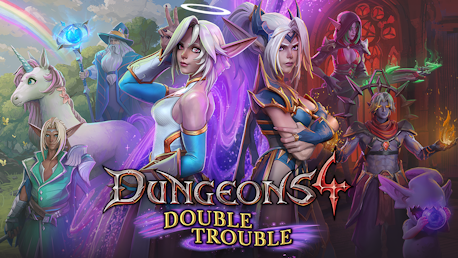
Dungeons 4 – Double Trouble introduces double the evil, double the chaos – and well, double the trouble. Sounds (doubly) fun, right?
Yes, Thalya’s back, and this time she’s brought… herself? A full-blown version from an alternate reality that shockingly did not fall under the pleasurable influence of the Absolute Evil. Surely nothing Good™ can come of this?! Now imagine the Narrator’s despair as he realizes he has to deal with two Thalyas, two Tristans – and two gazillion Dark Elves just for an extra pinch of fun. What follows is a family reunion so tense it’ll make your family Christmas celebrations look like a relaxing spa day – and yes, that includes Uncle Joe and his incontinent cats.
Hooked yet? Get your Snot-slapping Hand of Terror ready and prepare for a tale of evilness, sass, and seriously questionable life decisions!
- T stands for Trouble: Dungeons 4 – Double Trouble teleports you right into a new, compelling, fully voiced 4-mission campaign, including Thalyas and Tristans in various varieties, a Narrator barely holding onto his sanity, and some Dark Elves, just for the fun of it.
- Elves, but add some doom: Recruit new, gloomy Dark Elf units – the Beastmaster, the Blackguard, the Spellbreaker and the Dark Knight.
- Moar Rooms to rule them all: The Dark Elf Portal Room lets you recruit your doomed new Dark Elf units while the Animal Kennel allows you to tame creeps, including a new one, the Dark Entities, which you’ll probably grow to hate just as much as Manavores or Lavalumps.
- Glamorous General of Evil: Unlock four new skills (“Machine Gun Entity”, “Tamer”, “Dark Sun” and “The Dynamite Shepard”) for Thalya and out fashion your Good counterpart while slaying with your new Queen of the Dark Elves outfit.
- The night is dark and full of Elves: The new day/night cycle has found its way into the Overworld – once night falls, your brand-new Dark Elf units gain strength, and your enemies will learn about the power of darkness, painfully.


FREQUENTLY ASKED QUESTIONS
How does it work? Will I receive Dungeons 4 - Double Trouble as a physical copy?
No, you will receive Dungeons 4 - Double Trouble product key (Dungeons 4 - Double Trouble CD Key), that you will receive by e-mail. Afterwards, you will need to use the Steam-platform to redeem your Dungeons 4 - Double Trouble product key (Dungeons 4 - Double Trouble CD Key), and you'll be ready to download, install and play Dungeons 4 - Double Trouble. You will receive a step-by-step guide on how to do this along with your purchase. It's easy as can be!
Dungeons 4 – Double Trouble introduces double the trouble. Thalya’s back, and this time she’s joined by … herself, two versions of Tristan and some Dark Elves for that extra bit of evil fun and darkness. Get that Snot-slapping Hand of Terror ready!
Genre Simulation Strategy Single-player Multi-player Co-op Online Co-op Downloadable Content Steam Achievements Full controller support Steam Trading Cards Steam Cloud Includes level editor Family Sharing
Publisher Kalypso Media
PEGI-rating 
Udvikler Realmforge Studios
Platform PC
Sprog Engelsk Tysk Fransk Italiensk Spanish - Spain Arabic Japansk Koreansk Polsk Portuguese - Portugal Russisk Simplified Chinese Traditional Chinese Turkish Portuguese - Brazil
Release date 09-12-2025
System requirements PCMinimum:
- Requires a 64-bit processor and operating system
Recommended:
- Requires a 64-bit processor and operating system
No customer reviews for the moment.