 Contact
  Infocenter
  login
login Requires the base game Hunt: Showdown 1896 on Steam in order to use Hunt: Showdown 1896 - Last of the Herd.

 0 Produkt Produkty 0 Vare
 Brak produktów
Your basket contains
0 Product(s) for a total of: 0,00 €
0 Product(s) for a total of: 0,00 €

Produkt dodany poprawnie do Twojego koszyka
Ilość
Razem
Ilość produktów w Twoim koszyku: 0. Jest 1 produkt w Twoim koszyku.
Razem produkty:
Dostawa: Do ustalenia
Razem
Hunt: Showdown 1896 - Last of the Herd (PC)
Hunt: Showdown 1896 - Last of the Herd (PC)

Hunt: Showdown 1896 - Last of the Herd CD key to be activated and downloaded via Steam. You will not be sent any physical items in the mail. You will receive a(n) Steam product key via e -mail.

Additional content!
HUNT: SHOWDOWN 1896 - LAST OF THE HERD GAME DESCRIPTION
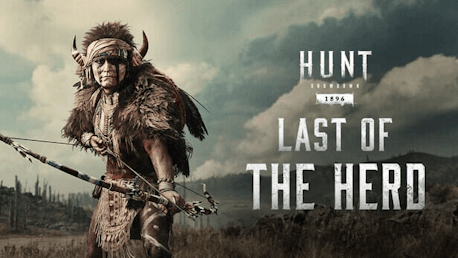
This DLC contains one Hunter, two Weapon Skins, and one Consumable Skin:
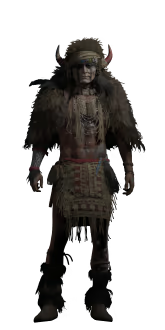
- Plains Warden (Hunter)
- Herd Thinner (Hunting Bow)
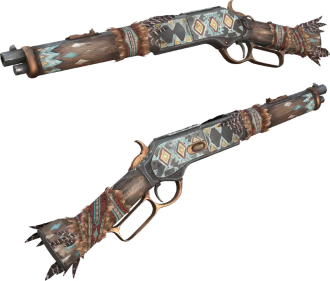
- Bison’s Leg (Centennial Shorty)
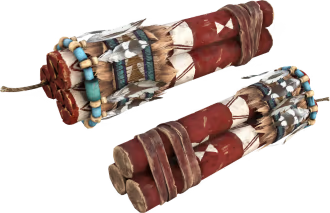
- Thunderbird’s Cry (Dynamite Bundle)
Plains Warden
In a land where myths were culled, carved, and left to fester in skull piles, Plains Warden made an oath: To become nature’s arrow. To pierce the damned who hold nothing but rot and oil in their hearts. To remember the herds that roam no more.
Herd Thinner
This Hunting Bow was once used towards the greater good, culling buffalo herds of the sick. When the bison were no more, Plains Warden shouldered this tool of mercy. Its twang rang again in Mammon’s Gulch, because is it not merciful to send the Corrupted back to hell?

Bison’s Leg
Plains Warden draws his strength from the land and the things dwelling in it. Tokens from the natural world adorn this Centennial Shorty, giving the land a chance to fight back.
Thunderbird’s Cry
This Dynamite Bundle announces itself with a roar like lightning splitting the heavens. Marked by Plains Warden so that in their last moments, its victims would know exactly who had killed them. It pays homage to the mythical beast whose wings darken the skies.
When the seemingly infinite herds of buffalo had been reduced to mounds of rotting corpses, Levi Anspach stood alone to mourn the slaughter. He had spent a life in harmony with these animals. Now that the balance was upset, he was left adrift with a gun and no purpose. He wandered the plains, looking for bison that the hunters might have missed. But that once untamed land was eventually shackled by railroads. It was the trains that rode fastest now, and their steel-eyed passengers saw far and shot freely. In the end, he was forced to confront the truth: His way of life had been murdered, and he would have to either find a new path or die along with it.
Levi chose the harder path. Turning to the west, he set out to find lawless places. There was a need for retribution burning in his soul. He found its outlet in violence. He pinned shameless hide hunters to wagon wheels and sent them off into frontier towns. His legend grew as bodies piled up and horses and livestock were set loose to roam the prairie lands.
While traveling his path of retribution, he found ranchers and cattle scorched and burning around a lonesome set of mountains: Mammon’s Gulch. A raging body of cinders walked the horizon. Monsters from myths and legends beyond the mouth of any tribe he’d known seemed to rage in this valley. He found himself in a new legend with a new hatred and a new hope that some things in his dying world could still be set right.


FREQUENTLY ASKED QUESTIONS
How does it work? Will I receive Hunt: Showdown 1896 - Last of the Herd as a physical copy?
No, you will receive Hunt: Showdown 1896 - Last of the Herd product key (Hunt: Showdown 1896 - Last of the Herd CD Key), that you will receive by e-mail. Afterwards, you will need to use the Steam-platform to redeem your Hunt: Showdown 1896 - Last of the Herd product key (Hunt: Showdown 1896 - Last of the Herd CD Key), and you'll be ready to download, install and play Hunt: Showdown 1896 - Last of the Herd. You will receive a step-by-step guide on how to do this along with your purchase. It's easy as can be!
This DLC contains one Hunter, two Weapon Skins, and one Consumable Skin: Plains Warden (Hunter), Herd Thinner (Hunting Bow), Bison’s Leg (Centennial Shorty), Thunderbird’s Cry (Dynamite Bundle)
Genre Action Multi-player PvP Online PvP Co-op Online Co-op Downloadable Content Steam Achievements Full controller support Steam Trading Cards In-App Purchases Steam Leaderboards Remote Play on Tablet Remote Play on TV
Publisher CryTek
PEGI-rating 
Udvikler Crytek
Platform PC
Sprog Engelsk Fransk Italiensk Tysk Spanish - Spain Russisk Simplified Chinese Polsk Turkish Japansk Portuguese - Brazil
Multiplayer Ja
Release date 17-04-2025
System requirements PCMinimum:
- Requires a 64-bit processor and operating system
Recommended:
- Requires a 64-bit processor and operating system
No customer reviews for the moment.