 Contact
  Infocenter
  login
login Requires the base game Hunt: Showdown 1896 on Steam in order to use Hunt: Showdown 1896 - The Last Laugh.

 0 Produkt Produkty 0 Vare
 Brak produktów
Your basket contains
0 Product(s) for a total of: 0,00 €
0 Product(s) for a total of: 0,00 €

Produkt dodany poprawnie do Twojego koszyka
Ilość
Razem
Ilość produktów w Twoim koszyku: 0. Jest 1 produkt w Twoim koszyku.
Razem produkty:
Dostawa: Do ustalenia
Razem
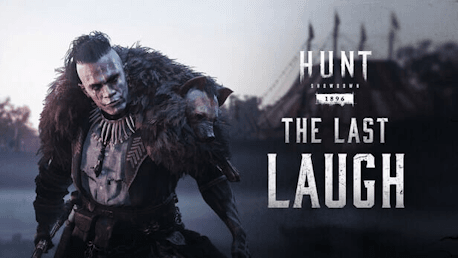
Hunt: Showdown 1896 - The Last Laugh (PC)
Hunt: Showdown 1896 - The Last Laugh (PC)

Hunt: Showdown 1896 - The Last Laugh CD key to be activated and downloaded via Steam. You will not be sent any physical items in the mail. You will receive a(n) Steam product key via e -mail.

Additional content!
HUNT: SHOWDOWN 1896 - THE LAST LAUGH GAME DESCRIPTION
This DLC contains one Hunter, two Weapons, and one Consumable:
- The Hyena (Hunter)
- Lion’s Roar (Centennial)
- Banner Shot (Pax Trueshot)
- Warm Embrace (Concertina Bomb)
The Hyena
Harlan Grant and his hyena Cackle were inseparable, stars of The Murder Circus. But when the HelioStone arrived, it Corrupted Cackle and Grant had to put his friend down. Now he fights alone against the HelioStone’s minions, carrying the memory of Cackle with him always.

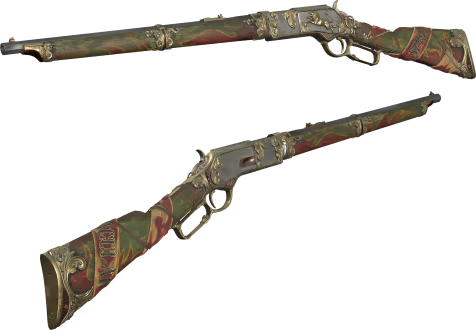
Lion’s Roar
The Ringmaster rescued a lion cub from a failing circus and trained it to jump through flaming hoops. When Corruption struck, the lion turned feral and set itself on fire. The Hyena killed the lion with this rifle to save the crowd.
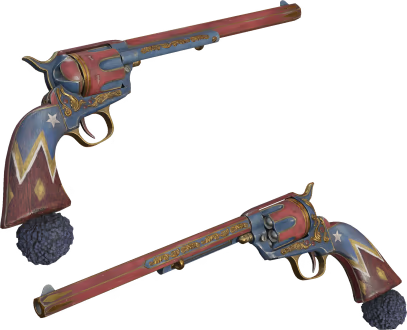
Banner Shot
Come one, come all! Wield the coveted revolver that once belonged to none other than the infamous Hyena, who dazzled many with its vibrant spectacles of death and grandeur! Perforate your prey with pizazz and try not to cackle at their desperation.
Warm Embrace
Something in an animal’s stare can change the heart of even the cruelest men. This Concertina Bomb was used by Harlan Grant to ensnare a hyena. A glint in the beast’s gaze softened him on the hot savannah, and he turned prey into pet.

A big game hunter who took down every kind of dangerous prey the world had to offer, Harlan Grant was equal parts admired and feared. Much of the fear came from his choice of pet: a snarling spotted hyena named Cackle, who Grant treated like a house cat and who returned Grant’s affection to him alone. Only Grant could control the beast, and they were inseparable. And when a guide told Grant he had killed every creature worth hunting, he put down his guns—temporarily—and joined The Murder Circus. He and Cackle were the stars of the show, or at least they were before the Ringmaster took the HelioStone in. Soon the tendrils of its power reached everywhere, Corrupting everything they touched. Grant stood firm against its influence, but Cackle was not so lucky. Horrified, the big game hunter watched his companion slowly change into something so vile he eventually had to make the call to put Cackle down.
He took up his guns once again. Then, with tears in his eyes, he pulled the trigger and walked away.
Since then, he has rebuffed every effort to recruit him to fight The Murder Circus alongside Post Malone, blaming him for Cackle’s death. But that doesn’t mean he won’t hunt down the circus—or the HelioStone.


FREQUENTLY ASKED QUESTIONS
How does it work? Will I receive Hunt: Showdown 1896 - The Last Laugh as a physical copy?
No, you will receive Hunt: Showdown 1896 - The Last Laugh product key (Hunt: Showdown 1896 - The Last Laugh CD Key), that you will receive by e-mail. Afterwards, you will need to use the Steam-platform to redeem your Hunt: Showdown 1896 - The Last Laugh product key (Hunt: Showdown 1896 - The Last Laugh CD Key), and you'll be ready to download, install and play Hunt: Showdown 1896 - The Last Laugh. You will receive a step-by-step guide on how to do this along with your purchase. It's easy as can be!
This DLC contains one Hunter, two Weapons, and one Consumable: The Hyena (Hunter), Lion’s Roar (Centennial), Banner Shot (Pax Trueshot), Warm Embrace (Concertina Bomb)
Genre Action Multi-player PvP Online PvP Co-op Online Co-op Downloadable Content Steam Achievements Full controller support Steam Trading Cards In-App Purchases Steam Leaderboards Remote Play on Tablet Remote Play on TV
Publisher CryTek
PEGI-rating 
Udvikler Crytek
Platform PC
Sprog Engelsk Fransk Italiensk Tysk Spanish - Spain Russisk Simplified Chinese Polsk Turkish Japansk Portuguese - Brazil
Multiplayer Ja
Release date 28-01-2025
System requirements PCMinimum:
- Requires a 64-bit processor and operating system
Recommended:
- Requires a 64-bit processor and operating system
No customer reviews for the moment.